Box Model

Understand content, padding, border, and margin.

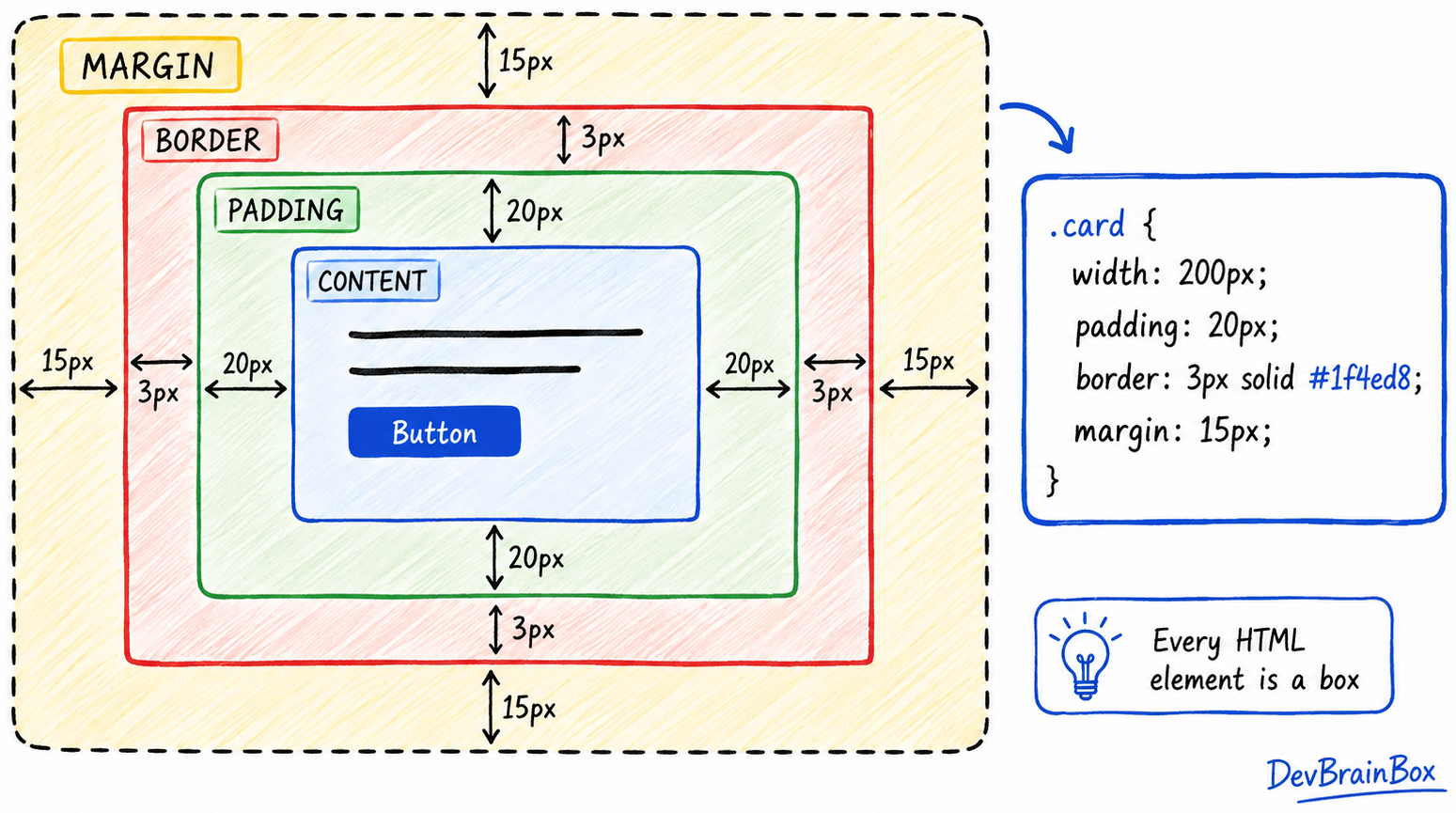
The CSS Box Model is one of the most important concepts in web design. Every HTML element on a webpage is treated as a rectangular box, and CSS uses the Box Model to determine how much space that element occupies.

Whether you are styling a button, image, heading, card, or form, the Box Model controls the size, spacing, and layout of the element.

Understanding the Box Model helps you create well-organized and visually appealing web pages.

Why Is the Box Model Important?

The Box Model helps developers:

  • Control the size of elements
  • Add spacing inside and outside elements
  • Create clean layouts
  • Improve website readability
  • Prevent design and alignment issues

For example, if a button looks too crowded, you can use the Box Model to add space around the text and improve its appearance.

Parts of the CSS Box Model

Every element consists of four main parts:

  1. Content
  2. Padding
  3. Border
  4. Margin

Think of a gift box:

  • The gift inside is the content.
  • The wrapping around the gift is the padding.
  • The box itself is the border.
  • The space between this box and other boxes is the margin.

Understanding these four layers makes designing web pages much easier.

Content Area

The content area is the actual text, image, or other content inside an element.

Example

css
.box {
  width: 300px;
  height: 150px;
}

Here, the content area has a width of 300 pixels and a height of 150 pixels.

Padding

Padding creates space between the content and the border.

Example

css
.box {
  padding: 20px;
}

This adds 20 pixels of space inside the element.

Padding is often used to make buttons, cards, and containers look less crowded.

Border

The border surrounds the content and padding.

Example

css
.box {
  border: 2px solid blue;
}

This creates a blue border that is 2 pixels thick.

Borders are useful for highlighting sections and creating visual separation.

Margin

Margin creates space outside the border.

Example

css
.box {
  margin: 30px;
}

This adds 30 pixels of space between the element and nearby elements.

Margins help prevent content from appearing too close together.

Complete Box Model Example

css
.card {
  width: 300px;
  padding: 20px;
  border: 2px solid gray;
  margin: 25px;
}

In this example:

  • The content width is 300px.
  • Padding adds internal spacing.
  • Border surrounds the element.
  • Margin creates external spacing.

Together, these properties define the total space occupied by the element.

Understanding Box Sizing

By default, CSS adds padding and borders to the specified width and height.

To make sizing easier, developers often use:

css
* {
  box-sizing: border-box;
}

This ensures that padding and borders are included within the element's specified width and height.

It helps create more predictable layouts.

Real-World Example

Imagine a product card on an e-commerce website:

  • The product image and text are the content.
  • Padding creates breathing room inside the card.
  • A border outlines the card.
  • Margin separates the card from other products.

Without proper spacing, the page would look cluttered and difficult to use.

Conclusion

The CSS Box Model is the foundation of webpage layout and spacing. Every HTML element consists of content, padding, border, and margin. By understanding how these parts work together, you can create cleaner, more organized, and professional-looking websites. Mastering the Box Model is an essential step toward becoming a skilled CSS developer.

Let's learn with DevBrainBox AI