CSS Combinators
Select elements by their relationship to other elements.
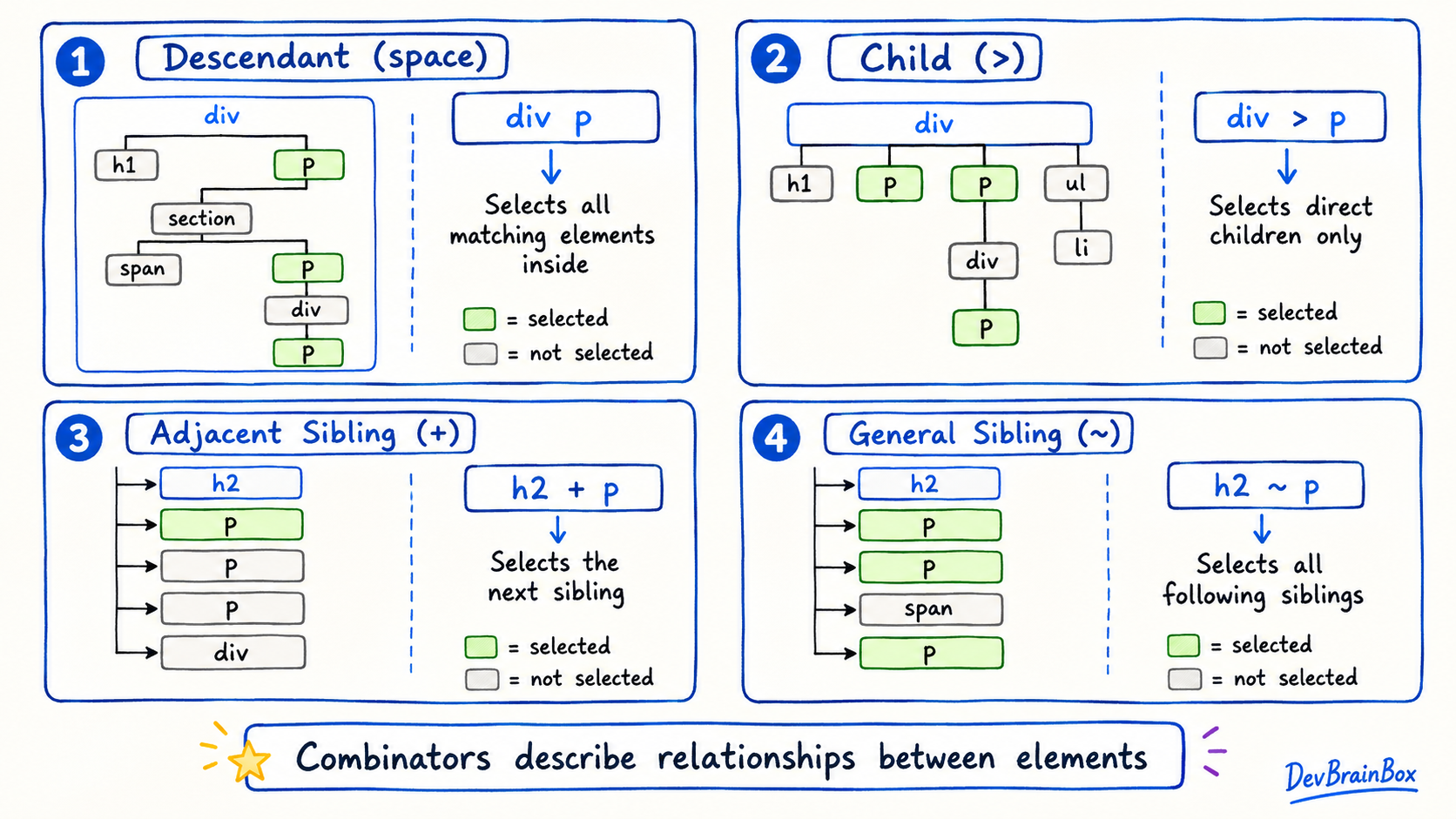
CSS combinators are special symbols or spaces used to describe the relationship between HTML elements.
CSS provides four main combinators:
- Descendant combinator (space)
- Child combinator (
>) - Adjacent sibling combinator (
+) - General sibling combinator (
~)
Descendant Combinator
The descendant combinator is written using a space between two selectors.
article p {
  color: blue;
}
This selector targets every <p> element located anywhere inside an <article>.
<article>
  <p>This paragraph becomes blue.</p>

  <div>
    <p>This paragraph also becomes blue.</p>
  </div>
</article>

<p>This paragraph is not affected.</p>
Important points:
- It selects children, grandchildren, and other nested descendants.
- The selected element does not need to be a direct child.
- Paragraphs outside the
<article>are not selected.
Use this combinator when you want to style elements anywhere inside a particular section.
Child Combinator
The child combinator uses the greater-than symbol (>). It targets elements that are direct children of another element.
article > p {
  color: green;
}
Consider this HTML:
<article>
  <p>This paragraph becomes green.</p>

  <div>
    <p>This paragraph is not selected.</p>
  </div>
</article>
The first paragraph is a direct child of <article>, so it receives the style. The second paragraph is inside a <div>, so it is not a direct child of the article.
article pselects all paragraphs inside the article.article > pselects only direct child paragraphs.
The child combinator is useful when you need more control over nested elements.
Adjacent Sibling Combinator
The adjacent sibling combinator uses a plus symbol (+). It selects the first matching element that appears immediately after another element.
h2 + p {
  font-weight: bold;
}<h2>CSS Basics</h2>
<p>This paragraph becomes bold.</p>
<p>This paragraph remains normal.</p>Only the first paragraph is selected because it appears directly after the <h2>.
If another element is placed between them, the paragraph will not be selected:
<h2>CSS Basics</h2>
<img src="css-image.jpg" alt="CSS illustration">
<p>This paragraph is not selected.</p>
Use the adjacent sibling combinator for styles such as:
- An introductory paragraph after a heading
- A message after a form field
- A description immediately following a title
General Sibling Combinator
The general sibling combinator uses a tilde symbol (~). It selects all matching sibling elements that appear after the first element.
h2 ~ p {
  color: brown;
}<section>
<h2>Course Details</h2>
<p>This paragraph becomes brown.</p>
<div>Course information</div>
<p>This paragraph also becomes brown.</p>
</section>Both paragraphs are selected because they:
- Appear after the
<h2>. - Share the same parent as the
<h2>.
A paragraph before the heading would not be selected. Matching elements do not need to appear immediately after the heading, so other elements can exist between them.
Combining Combinators
You can use more than one combinator in a selector.
nav > ul li a {
  color: navy;
}
This selector can be understood step by step:
- Find a
<ul>that is a direct child of<nav>. - Find an
<li>anywhere inside that list. - Select the links inside those list items.
Combining selectors is useful, but avoid making them unnecessarily long. Simple selectors are easier to understand and maintain.