HTML Structure
Understand the basic skeleton of an HTML document.
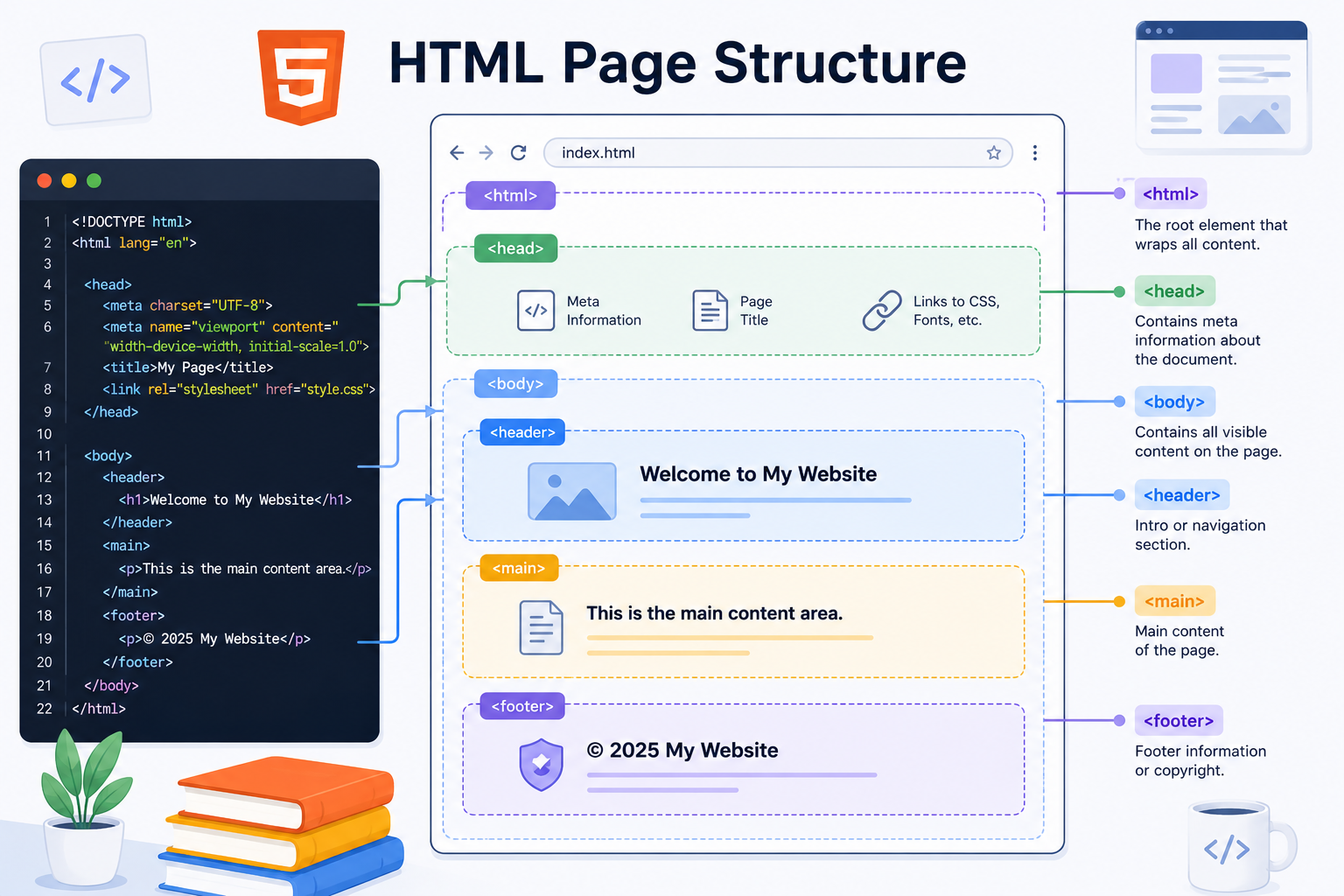
Every HTML webpage follows a basic structure. Think of it like building a house. Before adding furniture, paint, or decorations, you need a strong foundation and properly arranged rooms. Similarly, every webpage needs a well-organized HTML structure so browsers can understand and display the content correctly.
Basic Structure of an HTML Document
Every HTML page typically starts with the following structure:
<!DOCTYPE html>
<html>
<head>
    <title>My First Web Page</title>
</head>
<body>
    <h1>Welcome</h1>
    <p>Hello World!</p>
</body>
</html>
Let's understand each part.
<!DOCTYPE html>
This declaration tells the browser that the document uses HTML5, which is the latest version of HTML.
<!DOCTYPE html>It should always be the first line in your HTML file.
<html> Element
The <html> tag is the root element of the webpage. Everything on the page is placed inside this tag.
<html>
    ...
</html>
You can think of it as the container that holds the entire webpage.
<head> Element
The <head> section contains information about the webpage that is not directly visible to visitors.
<head>
    <title>My First Web Page</title>
</head>
Common items placed inside the head include:
- Page title
- Meta information
- CSS links
- JavaScript files
<title> Element
The title tag defines the title shown in the browser tab.
<title>My First Web Page</title>This helps users identify the page when multiple tabs are open.
<body> Element
The body section contains all the content visible on the webpage.
<body>
    <h1>Welcome</h1>
    <p>Hello World!</p>
</body>
Everything users see, including headings, paragraphs, images, links, buttons, and forms, belongs inside the body.
Best Practices
When creating HTML documents:
- Always start with
<!DOCTYPE html>. - Keep content inside the correct elements.
- Use proper indentation for readability.
- Write meaningful page titles.
- Ensure every opening tag has a matching closing tag when required.
Key Takeaways
- Document Structure is an important topic to understand.
- Start with small examples and practice one step at a time.
- Use the idea in simple projects so it becomes easier to remember.